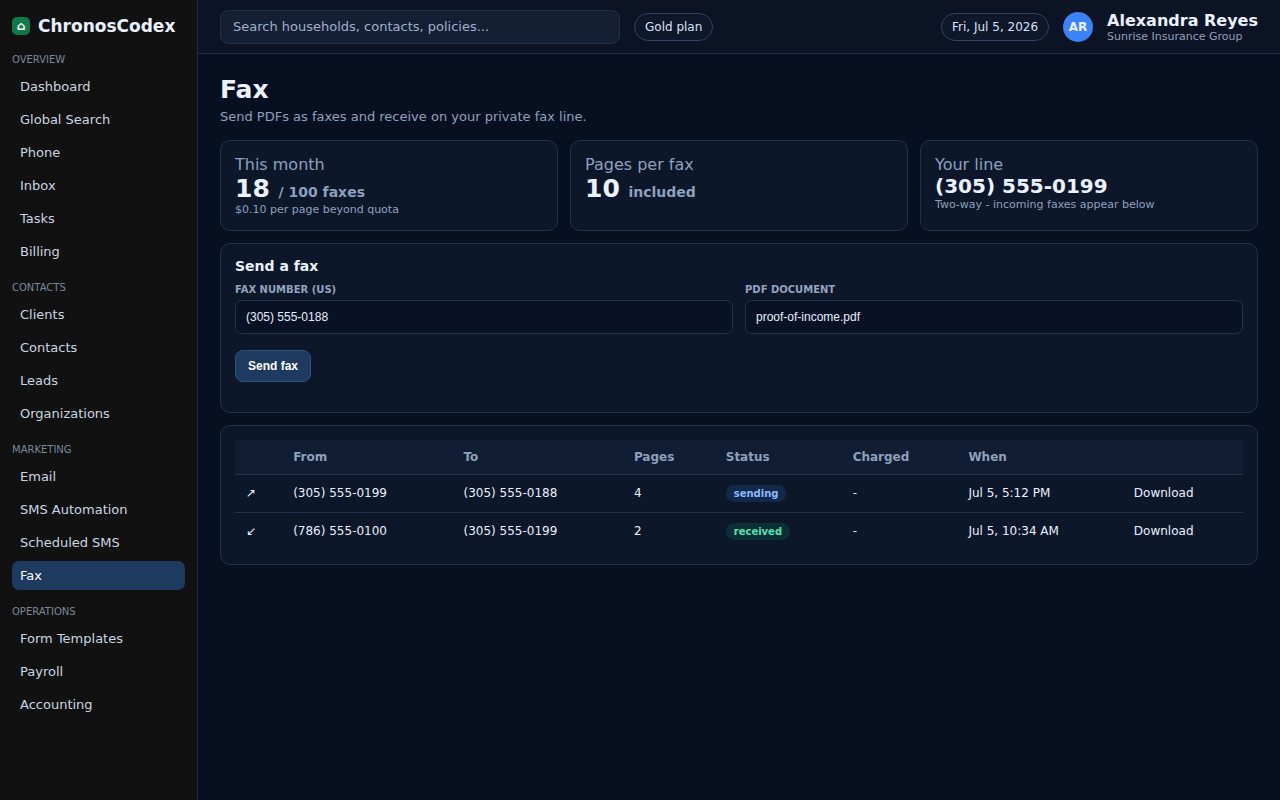
Use the fax workflow for carrier, document, and compliance tasks that still require fax delivery or receipt.
Before You Start
- Confirm your agency has fax enabled.
- Know the recipient fax number and what documents are approved to send.
- Avoid sending sensitive documents to an unverified number.
Step-by-Step
- Open Fax from the left navigation.
- Confirm the sending number or shared agency fax number.
- Choose the compose/send fax action.
- Enter the verified recipient fax number.
- Attach the correct document from the household or your approved upload source.
- Add a cover note when required.
- Send the fax.
- Return to the household and record the fax in notes or documents.
Confirm It Worked
- The fax appears in sent or activity history.
- The household has a note showing what was sent.
- Failed fax attempts are retried or escalated.
Common Issues
- If no fax number is available, review phone number setup or ask an admin.
- If upload fails, check file type and size.
- If the fax fails, verify the recipient number before resending.
Need help or see a different screen? Reply below with the page you are on and what you expected to happen.

ChronosCodex — The Complete Insurance Management System for Agencies
chronoscodex.com