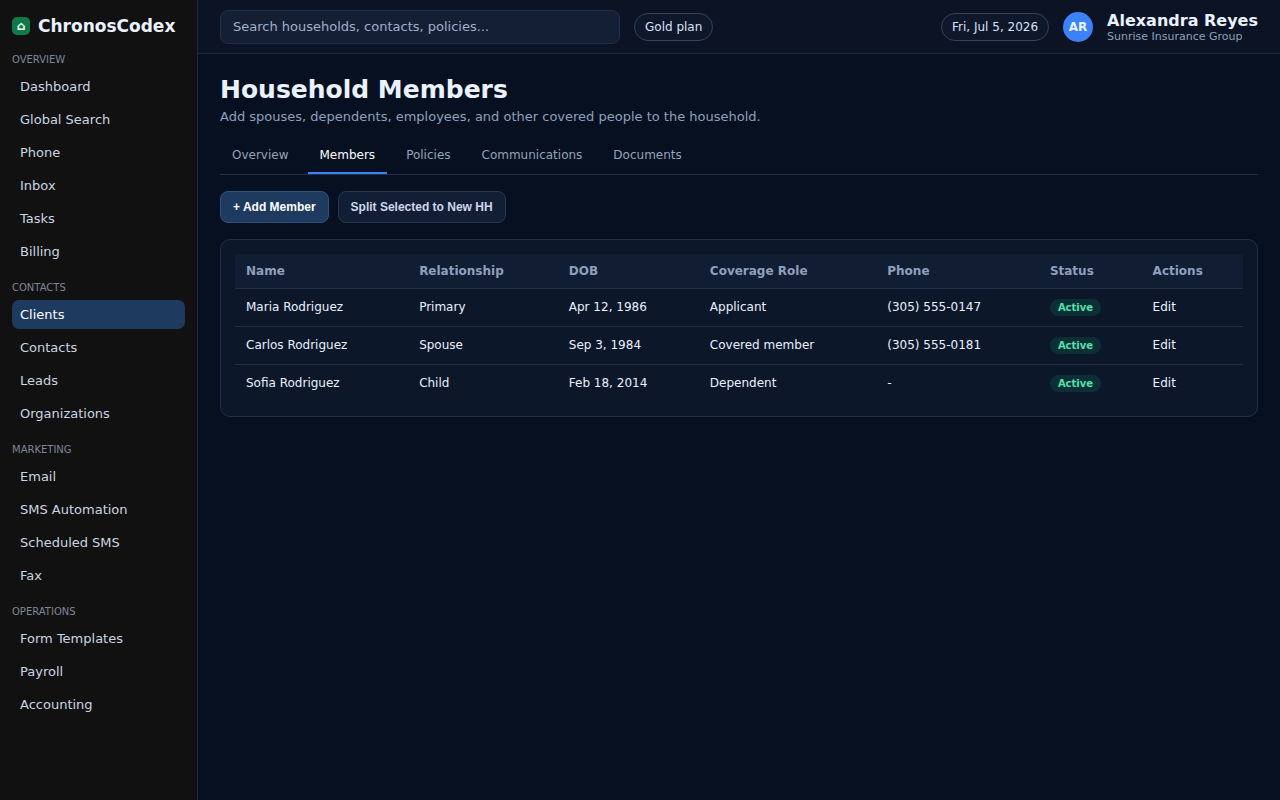
Use household members to keep dependents, spouses, and additional applicants connected to the same household record.
Before You Start
- Open the correct household profile.
- Collect member name, relationship, date of birth if needed, phone/email if separate, and coverage role.
Step-by-Step
- Open the household profile.
- Select the Members tab.
- Choose the add member action.
- Enter the member details and relationship to the primary contact.
- Mark whether the member is applying, covered, inactive, or only part of the household record.
- Save the member.
- Return to the household overview and confirm the member count increased.
Confirm It Worked
- The new member appears under Members.
- The household header reflects the updated member count.
- Policy and DMI work can now reference the correct person.
Common Issues
- If the member belongs to another household, do not duplicate without confirming with an admin.
- If a member should receive messages directly, add their own phone or email.
- If coverage status is unclear, leave a note for follow-up.
Need help or see a different screen? Reply below with the page you are on and what you expected to happen.

ChronosCodex — The Complete Insurance Management System for Agencies
chronoscodex.com